
Push notifications
What is a push notification?
A push notification is a short message sent from a server to one device through the operating system's push service. The message appears on the lock screen or in the notification centre even when the app is closed. The person on that device has to grant permission first. Without permission, the operating system delivers nothing.
How does a push notification reach a phone?
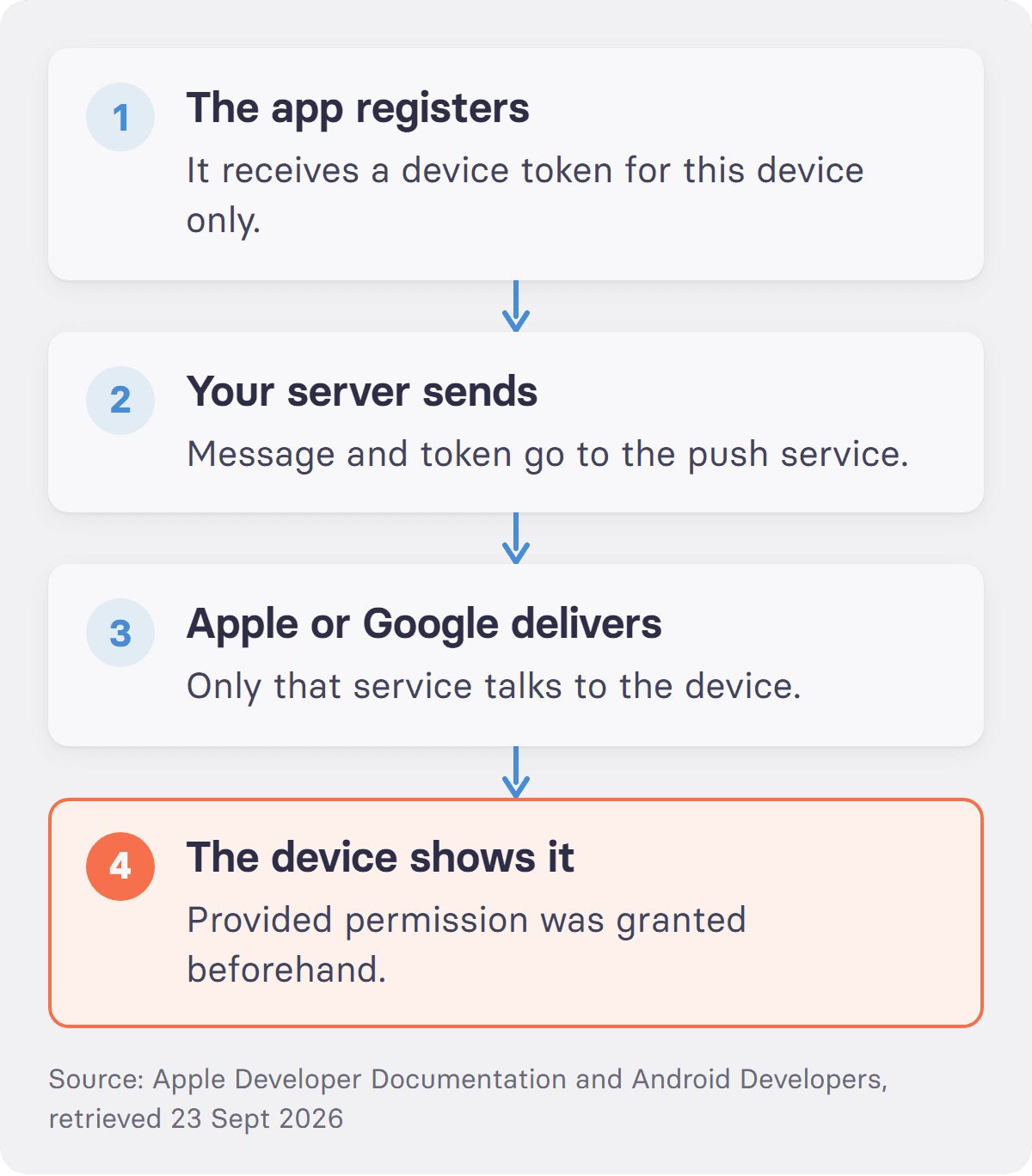
Three parties handle the trip, and the sender controls only one of them. On first launch, the app registers with the push service of its operating system and receives a device token. Apple's documentation for the Apple Push Notification service describes that token as an address "unique to both the device and your app", and adds that "every app must request their own unique device token". The app passes that token to its own server. To send later, the server hands the message and the token to Apple or Google, and only that service talks to the device. Two limits shape what a push notification can say. Apple caps the payload of a remote notification at 4 KB, and at 5 KB for VoIP messages, according to its own documentation. Delivery is also best effort. If the device is off or offline, the push service holds the message for a limited time and may drop it.
Web push works on the same principle through a different route. As MDN puts it, "For an app to receive push messages, it has to have an active service worker", and the resulting subscription carries "an endpoint and the encryption key needed for sending data". That is why a browser can show a notification with its tab closed.
What does it mean to enable push notifications?
It means granting the operating system permission to show messages from one specific app. Apple states the rule plainly in its developer documentation: "Because a person might consider notification-based interactions disruptive, you must obtain permission to use them." Android used to be looser. Since Android 13 it matches. Google's documentation says that "Android 13 (API level 33) and higher supports a runtime permission for sending non-exempt (including Foreground Services (FGS)) notifications from an app: POST_NOTIFICATIONS", and that permission is requested at runtime, not at install.
Permission is also revocable in two taps, per app, at any time. That single fact should govern how often an app sends.
What is the difference between a push notification and an in-app message?
An in-app message waits. It appears only when someone opens the app anyway, so it needs no permission and interrupts nobody. A push notification does the opposite: it reaches into whatever the person is doing right now. The split follows from that. Anything that cannot wait an hour goes out as a push. Everything else, from a survey to a menu, sits in the app until the next visit.
What is the difference between a push notification and an SMS?
An SMS travels over the mobile network, costs money per message, and reaches any phone with a number, including a handset with no apps at all. A push notification travels over the operating system's push service, costs nothing per message, and needs an installed app plus permission. In a workplace, the trade is clear. SMS needs the private phone numbers of staff, which is personal data with all the duties that follow. Push needs an install and a launch campaign instead.
Why do employers use push notifications internally?
Because a push notification is the only channel that reaches a named person who has no company account. In Germany in 2025, 68.4% of people employed in businesses with ten or more staff had internet access for work purposes, according to Eurostat. The figure was 64.1% in manufacturing, 61.3% in transport and storage, 60.6% in construction, 47.6% in accommodation and food service, and 39.2% in food, beverage and tobacco manufacturing. The EU27 average was 64.6%. The survey covers businesses with ten or more employees and excludes agriculture, mining and the financial sector. Read what that means for a message rather than the number itself. An email distribution list reaches a minority of a food plant by construction, because the rest have no mailbox. A printed notice reaches only the people who walk past it while it is current. A push notification reaches the night shift on the evening before the shift, on the phone already in their pocket, which is why it should be reserved for the messages that genuinely cannot wait.
When are push notifications the wrong tool?
Whenever the message is not urgent. Every notification nobody needed lowers the odds that the next one gets opened, and permission can be withdrawn in seconds. Push is also not an alerting system. There is no guaranteed delivery, no system-level read receipt, and no fallback when a device is switched off. Safety-critical alerting with an audit trail needs a product built for that job, sitting alongside the app rather than inside it.
How does tchop handle push notifications for employees?
tchop sends push notifications to a company's own branded app, reaching staff who have no work email address and no company device. People register with an access code from their employer instead of a corporate account, the app carries the company's name in the App Store and on Google Play, and data can be hosted in the EU. Several regional AOK health insurers reach their branch and back-office staff through their own app on tchop. One limit belongs here: tchop does not send SMS and does not replace an emergency alerting system with guaranteed delivery.
More on the engagement tools tchop provides.
FAQs: push notifications
Should push notifications be on or off?
On for the few apps whose messages you would want interrupted for, and off for the rest. The useful test is what you would do in the next ten minutes if the message arrived. A shift change, a delivery, a payment alert or a safety notice passes that test. Marketing and social apps usually do not.
What is an example of a push notification?
A bank telling you a card payment went through. A parcel service telling you the driver is two stops away. An employer telling a night shift that the entrance has moved. All three share the same shape: a short line of text, sent by a server, shown by the operating system without the app being open.
What is the difference between a push notification and a notification?
"Notification" covers everything the operating system shows in the notification centre, including alerts a local app schedules by itself, such as an alarm or a calendar reminder. A push notification is the subset that arrives from a remote server through the push service. The difference is the origin, not the look.
Why did my push notifications stop working?
Four causes cover most cases. Permission was withdrawn for that app. The device has battery optimisation switched on and is holding background work. The app was reinstalled, which issues a new device token that the sender does not yet have. Or the message was sent while the device was offline for longer than the push service keeps it.
Sources
Apple Developer Documentation, "Registering your app with APNs" and "Generating a remote notification", retrieved 23 September 2026
Android Developers, "Notification runtime permission", retrieved 23 September 2026
MDN Web Docs, "Push API", retrieved 23 September 2026
Related: employee app · intranet, in the glossary · all audience engagement terms