Single sign-on (SSO)
Single sign-on means one sign-in covers many applications. How the exchange works, which standards carry it, the central risk, and who it leaves out.
What is single sign-on?
Single sign-on, or SSO, means one sign-in covers many applications. A central service checks who a person is, and every connected application trusts that check instead of holding its own password. The person signs in once and reaches everything they are entitled to. The applications never see the password at all.
How does single sign-on work, step by step?
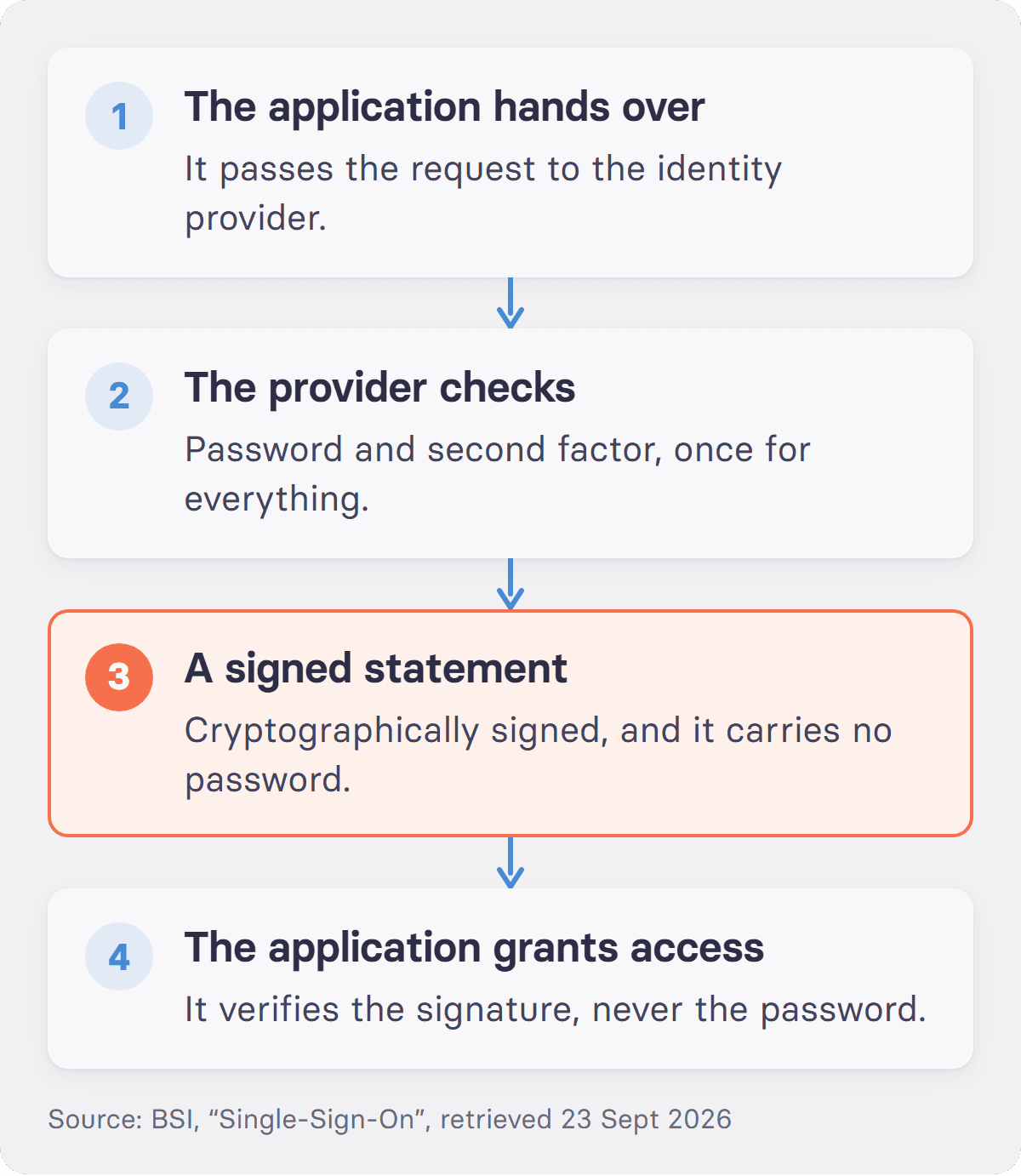
Four steps. The application a person wants to reach hands the request to the central sign-in service, known as the identity provider. That service checks whether the person is already signed in, and otherwise asks for a password and a second factor. On success it issues a signed statement about who the person is. The application checks the signature and grants access. Step three is the one that matters. Germany's Federal Office for Information Security says the statement carries "eine elektronische Signatur, die auf sogenannten asymmetrischen Kryptoalgorithmen basiert", an electronic signature based on asymmetric cryptography. That signature is what lets the application confirm the statement came from the central service and not from an attacker. The same BSI guide also gives the plainest translation of the term available: "Single-Sign-On bedeutet übersetzt Einmalanmeldung", single sign-on means single login.
Which standards carry SSO?
Three protocols cover almost the whole market, and confusing two of them is the most common mistake in a procurement call. SAML 2.0 was ratified as an OASIS standard in March 2005 and remains common in established enterprise environments. OAuth 2.0 governs authorisation, meaning delegated access, and was published by the IETF in October 2012 as RFC 6749; its abstract describes a framework that "enables a third-party application to obtain limited access to an HTTP service". OpenID Connect is the identity layer built on top of OAuth 2.0.
The split is worth memorising. OAuth answers what an application is allowed to do. OpenID Connect answers who is here. A vendor that lists "SSO" on a feature matrix has not yet said which of the three it speaks, and that is the question to ask.
Is single sign-on worth it?
For anyone who already has an account, yes, and the reasoning is usability rather than convenience. NIST puts it this way in Special Publication 800-63B: "The overarching authentication usability goal is to minimize user burden and authentication friction (e.g., the number of times a user has to authenticate, the steps involved, and the amount of information he or she has to track). Single sign-on exemplifies one such minimization strategy."
Two operational gains follow. Fewer sign-ins mean fewer passwords written down, reused or chosen badly, because there is only one to get right. Removing access when someone leaves becomes a single action in one directory. That replaces a checklist across twenty tools, which is where offboarding usually fails. The trade is that the single action now matters absolutely. So the central account needs three things: a strong second factor, a session lifetime that suits the device, and a sign-out that ends every session rather than the current browser tab. On a tablet shared by a maintenance team, a session that lasts for days is not a sign-in at all.
What is the risk of single sign-on?
One account now opens everything. The BSI states it without hedging: "Risiko Nr. 1: Ist der zentrale Account geknackt, sind alle Accounts geknackt", meaning if the central account is cracked, all accounts are cracked. Anyone who reaches the central account reaches every connected service behind it.
That does not argue against SSO. It argues for putting the strongest protection on the one account that matters, preferably a phishing-resistant second factor, and for monitoring sign-ins to that account more closely than anything else in the estate.
Who does single sign-on leave out?
Everyone without an account in the directory. SSO presumes an identity, usually tied to a work email address, and in production, care and logistics that identity often does not exist. In Germany in 2025, 68.4% of people employed in businesses with ten or more staff had internet access for work purposes, according to Eurostat, falling to 60.6% in construction, 61.3% in transport and storage and 39.2% in food, beverage and tobacco manufacturing. For those people SSO solves nothing, because it simplifies access for people who already have it.
How does tchop handle single sign-on?
tchop connects to an existing identity provider and also allows access without a company account. Office and administrative staff sign in through the company's central service, production staff register with an access code, and both arrive in the same app under the company's own name. At AOK PLUS, staff sign in to the app with their existing company credentials through AOK's own single sign-on, so nobody needs a second account. One limit belongs here: tchop is not an identity provider and does not manage identities for other systems.
More on the security page at tchop.
FAQs: single sign-on
What is SSO with an example?
Signing in to a website by choosing "continue with Google" is single sign-on. Google is the central service, the website trusts Google's answer, and no new password is created. In a company the mechanism is identical, with the employer's directory in the role Google plays there.
Is a Google account an SSO?
It acts as one whenever another site accepts it as a sign-in. The account itself is just an account. What makes it single sign-on is the trust relationship: the other site stops asking for its own password and accepts a signed statement from Google instead. The same is true for Microsoft and Apple accounts.
What is the difference between SSO and a password manager?
A password manager stores many passwords and types them for you. With SSO the other passwords do not exist, because the applications hold no credentials of their own and defer to the central service. A password manager manages the problem. Single sign-on removes it.
How do I turn on single sign-on?
For a company application, an administrator configures it: register the application with the identity provider, exchange the signing certificate or client credentials, map which directory groups get access, and test with a pilot group before switching everyone over. Individuals cannot enable it themselves, because it is a trust relationship between two systems.
Sources
Bundesamt für Sicherheit in der Informationstechnik, "Single-Sign-On", retrieved 23 September 2026
IETF, RFC 6749 "The OAuth 2.0 Authorization Framework", October 2012
NIST Special Publication 800-63B, "Digital Identity Guidelines: Authentication and Lifecycle Management"
Eurostat, dataset
isoc_ci_cm_pn2, Germany 2025, data updated 15 June 2026SAML 2.0 ratification date: OASIS Standard, March 2005, per the summary in Wikipedia